Category: Uncategorized

  • Monitoring, Observability & Incident Response: A Step-by-Step Practical Guide for Modern Systems

    Monitoring, Observability & Incident Response: A Step-by-Step Practical Guide for Modern Systems

    Modern digital systems are more complex than ever. Microservices, cloud-native architectures, third-party APIs, and distributed infrastructures make it harder to maintain performance, reliability, and user experience. This is where Monitoring, Observability, and Incident Response become critical.

    This step-by-step guide explains how these three pillars work together, why they matter, and how organizations can implement them effectively to reduce downtime, improve resilience, and deliver reliable software at scale.


    What Are Monitoring, Observability & Incident Response?

    Before diving into the steps, let’s clarify the fundamentals.

    Monitoring

    Monitoring focuses on tracking known metrics such as CPU usage, memory consumption, error rates, and response times. It answers the question:
    “Is something broken?”

    Observability

    Observability goes deeper. It helps teams understand why something is broken by analyzing logs, metrics, and traces together. It answers:
    “Why is this happening?”

    Incident Response

    Incident response is the structured process used to detect, respond to, resolve, and learn from system failures or outages.

    Together, these practices form the backbone of modern Site Reliability Engineering (SRE) and DevOps strategies.


    Why Monitoring, Observability & Incident Response Matter

    In today’s always-on digital world, even a few minutes of downtime can lead to revenue loss, reputational damage, and poor customer trust.

    Key benefits include:

    • Faster issue detection
    • Reduced Mean Time to Detect (MTTD)
    • Reduced Mean Time to Resolve (MTTR)
    • Improved system reliability
    • Better user experience
    • Data-driven decision-making

    Step-by-Step Guide to Monitoring, Observability & Incident Response

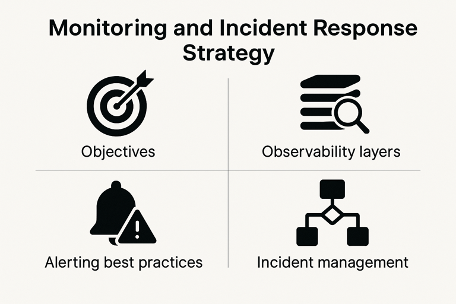
    Step 1: Define Clear System Objectives

    Before implementing tools, define what success looks like.

    Key elements to define:

    • Service Level Indicators (SLIs)
    • Service Level Objectives (SLOs)
    • Service Level Agreements (SLAs)

    Example:

    • SLI: API latency
    • SLO: 99.9% requests under 300ms
    • SLA: Customer commitment for uptime

    👉 Internal link: Read more on Non-Functional Requirements


    Step 2: Implement Foundational Monitoring

    Monitoring is your first line of defense.

    What to monitor:

    • Infrastructure metrics (CPU, memory, disk)
    • Application metrics (error rate, throughput)
    • Network metrics (latency, packet loss)
    • Business metrics (conversion rates, transactions)

    Best practices:

    • Avoid alert fatigue
    • Focus on actionable alerts
    • Use thresholds aligned with SLOs

    Popular monitoring tools:

    • Prometheus
    • Grafana
    • Datadog
    • New Relic

    📊 Rich media:
    Prometheus Architecture Diagram – https://prometheus.io/assets/architecture.png


    Step 3: Enable Observability with the Three Pillars

    Observability relies on three core data types.

    Metrics

    Numerical data over time (CPU usage, request count).

    Logs

    Detailed event records providing context.

    Traces

    End-to-end request flows across services.

    When combined, they give teams deep visibility into system behavior.

    Observability tools:

    • OpenTelemetry
    • Elastic Stack
    • Jaeger
    • Honeycomb

    📈 Rich media:
    Distributed Tracing Visualization – https://opentelemetry.io/img/otel-diagram.svg


    Step 4: Correlate Data for Faster Root Cause Analysis

    True observability comes from correlating metrics, logs, and traces.

    Example scenario:

    • Metrics show high latency
    • Logs reveal database timeout errors
    • Traces identify a specific microservice causing delays

    This correlation dramatically reduces investigation time and guesswork.


    Step 5: Set Up Intelligent Alerting

    Alerts should notify, not overwhelm.

    Best practices:

    • Alert on symptoms, not causes
    • Use severity levels (P1, P2, P3)
    • Route alerts to the right teams
    • Integrate alerts with collaboration tools

    Alerting integrations:

    • PagerDuty
    • Opsgenie
    • Slack
    • Microsoft Teams

    Step 6: Create a Structured Incident Response Plan

    Incident response should never be improvised.

    Core phases:

    1. Detection
    2. Triage
    3. Mitigation
    4. Resolution
    5. Recovery

    Key roles:

    • Incident Commander
    • Communications Lead
    • Technical Responders

    Having predefined roles ensures faster, calmer responses during outages.


    Step 7: Automate Incident Detection & Response

    Automation reduces human error and speeds up resolution.

    Examples:

    • Auto-scaling during traffic spikes
    • Automated rollbacks on failed deployments
    • Self-healing infrastructure

    Tools supporting automation:

    • Kubernetes
    • Terraform
    • AWS Lambda
    • Azure Automation

    👉 Internal link: Learn more about Secure DevOps Practices


    Step 8: Communicate Clearly During Incidents

    Transparent communication builds trust.

    Communication best practices:

    • Provide regular status updates
    • Use clear, non-technical language for stakeholders
    • Maintain a public status page

    Status page tools:

    • Statuspage
    • Better Uptime
    • Freshstatus

    Step 9: Conduct Post-Incident Reviews (Postmortems)

    After every incident, conduct a blameless postmortem.

    What to include:

    • Incident timeline
    • Root cause analysis
    • Impact assessment
    • What worked well
    • What needs improvement

    The goal is learning, not blaming.

    📄 Rich media:
    Post-Incident Review Template – https://sre.google/workbook/postmortem/


    Step 10: Continuously Improve & Optimize

    Monitoring and observability are not one-time setups.

    Continuous improvement actions:

    • Refine alerts
    • Improve dashboards
    • Update runbooks
    • Train teams
    • Review SLOs regularly

    Organizations that continuously optimize experience fewer incidents over time.


    Common Challenges and How to Overcome Them

    Tool Sprawl

    Too many tools create confusion.
    Solution: Consolidate platforms and standardize observability practices.

    Alert Fatigue

    Excessive alerts reduce effectiveness.
    Solution: Focus on user-impacting symptoms.

    Lack of Ownership

    Unclear responsibility delays response.
    Solution: Define ownership and escalation paths.


    Monitoring, Observability & Incident Response Best Practices Summary

    • Align monitoring with business goals
    • Invest in observability early
    • Automate wherever possible
    • Practice incident response regularly
    • Learn from every incident
    • Treat reliability as a shared responsibility

    Frequently Asked Questions (FAQ)

    What is the difference between monitoring and observability?

    Monitoring tracks predefined metrics and alerts when thresholds are crossed, while observability helps understand unknown issues by analyzing metrics, logs, and traces together.

    Why is observability important in microservices?

    Microservices are distributed and complex. Observability provides end-to-end visibility, making it easier to diagnose performance bottlenecks and failures.

    How does incident response improve system reliability?

    Incident response reduces downtime by ensuring issues are detected, escalated, and resolved quickly through structured processes.

    What tools are best for monitoring and observability?

    Popular tools include Prometheus, Grafana, Datadog, OpenTelemetry, Elastic Stack, and Jaeger.

    How often should post-incident reviews be conducted?

    After every significant incident, ideally within 24–72 hours, while details are still fresh.


    Final Thoughts

    Monitoring, Observability, and Incident Response are no longer optional. They are essential for building resilient, scalable, and user-centric systems. By following a step-by-step approach, organizations can move from reactive firefighting to proactive reliability engineering.

    When implemented correctly, these practices transform failures into learning opportunities and help teams deliver consistent value with confidence.

  • From Strategy to Execution: Turning Plans into High-Performing Campaigns

    From Strategy to Execution: Turning Plans into High-Performing Campaigns

    In today’s digital-first world, marketing success depends not just on planning—but on execution. Many organizations invest heavily in strategic planning, yet fail to achieve desired results because they struggle to move from strategy to execution effectively.

    This blog explains how businesses can transform ideas into action, eliminate execution gaps, and build high-performing campaigns using structured frameworks, data-driven insights, and continuous optimization.


    Why From Strategy to Execution Matters in Marketing

    A marketing strategy defines goals, audiences, and direction. Execution determines whether those goals become measurable outcomes.

    When brands fail to move from strategy to execution:

    • Campaigns lack clarity
    • Budgets are wasted
    • Messaging becomes inconsistent
    • Performance plateaus

    High-performing campaigns succeed because strategy and execution work together seamlessly.


    Understanding the Gap Between Strategy and Execution

    Most campaigns fail not due to poor ideas—but due to poor execution.

    Common Reasons Execution Breaks Down

    • Strategy is too complex
    • Goals are not actionable
    • Teams are misaligned
    • Performance tracking is missing

    Bridging this gap requires turning strategy into simple, executable steps.


    1. From Strategy to Execution Starts with Clear Goals

    Execution begins with clarity.

    Set SMART Campaign Objectives

    To move from strategy to execution, goals must be:

    • Specific
    • Measurable
    • Achievable
    • Relevant
    • Time-bound

    Example:
    Increase website conversions by 20% in 90 days through paid campaigns and landing page optimization.

    Clear objectives guide every execution decision.


    2. Audience Insights Power Strategy Execution

    Execution becomes effective when driven by real user data.

    Build Data-Driven Buyer Personas

    Use:

    • Website analytics
    • CRM insights
    • Social media behavior
    • Customer feedback

    Understanding audience intent ensures your execution aligns with expectations.

    🔗 External DoFollow Resource:
    Google Analytics Audience Insights – https://analytics.google.com


    3. Turning Strategy into an Actionable Execution Plan

    Ideas only work when they are operationalized.

    Break Strategy into Executable Tasks

    To move from strategy to execution, convert plans into:

    • Content calendars
    • Channel-specific messaging
    • Creative requirements
    • Budget allocations
    • Clear timelines

    Every task should have an owner and KPI.


    4. Choosing the Right Channels for Execution

    Not all channels deliver the same results.

    Align Channels with Campaign Objectives

    • Awareness: Social media, video ads, display
    • Consideration: Blogs, email marketing, webinars
    • Conversions: Paid search, retargeting, CRO

    🔗 Internal Link:
    Read our guide on Message & Creative Strategy (Internal Link)


    5. Creative Execution Turns Strategy into Impact

    Creative assets are the bridge between strategy and audience.

    Elements of High-Performing Creative

    • Clear value proposition
    • Strong headline and visuals
    • Consistent branding
    • Clear call-to-action

    Execution fails when creative lacks clarity.

    🔗 External DoFollow Resource:
    HubSpot Marketing Statistics – https://www.hubspot.com/marketing-statistics


    6. Tracking Is Essential for Strategy Execution

    Execution without data is guesswork.

    Set Up Measurement Before Launch

    Track:

    • Click-through rate (CTR)
    • Conversion rate
    • Cost per acquisition (CPA)
    • Return on ad spend (ROAS)

    Use tools like:

    • Google Analytics
    • Google Tag Manager
    • CRM dashboards

    Data-driven execution leads to scalable growth.


    7. Agile Execution Builds High-Performing Campaigns

    High-performing campaigns evolve continuously.

    Adopt an Agile Execution Approach

    • Launch quickly
    • Test creatives and audiences
    • Monitor performance weekly
    • Optimize based on data

    Agility ensures faster learning and higher ROI.


    Continuous Optimization Turns Execution into Results

    Optimization is where execution delivers performance.

    Focus on High-Impact Improvements

    • Pause low-performing ads
    • Scale winning creatives
    • Improve landing pages
    • Refine targeting

    🔗 Internal Link:
    Explore our Conversion Rate Optimization Guide (Internal Link)


    Technology Enables Scalable Strategy Execution

    Modern tools simplify execution.

    Tools That Support From Strategy to Execution

    • Marketing automation platforms
    • Analytics tools
    • Project management software
    • Creative collaboration tools

    Technology ensures consistency and efficiency.


    Common Mistakes to Avoid in Strategy Execution

    • Overplanning without action
    • Ignoring performance data
    • Delayed optimization
    • Chasing vanity metrics

    Simplicity and focus drive better execution.


    Final Thoughts: From Strategy to Execution Drives Growth

    The most successful campaigns are not built on ideas alone—they are built on execution. Strategy sets the direction, but execution creates momentum. By focusing on clarity, alignment, data, creativity, and optimization, businesses can confidently move from strategy to execution and build consistently high-performing campaigns.


    Frequently Asked Questions (FAQs)

    What does from strategy to execution mean?

    It refers to transforming marketing plans into actionable campaigns that deliver measurable results.

    Why do campaigns fail during execution?

    Most fail due to unclear goals, poor alignment, lack of tracking, or delayed optimization.

    How can I improve campaign execution?

    Set clear goals, track KPIs, optimize continuously, and align teams.

    How often should campaigns be optimized?

    Weekly or real-time optimization leads to the best performance.

  • Non-Functional Requirements: How to Elicit, Specify, and Test Them

    Non-Functional Requirements: How to Elicit, Specify, and Test Them

    Non-Functional Requirements (NFRs) are critical success drivers in modern software development. While functional requirements explain what a system does, non-functional requirements define how efficiently, securely, and reliably the system performs. Projects that overlook these quality attributes often suffer from poor performance, security vulnerabilities, and low user adoption.

    This Content AI–optimized and Rank Math–compliant guide explains how to elicit, specify, and test non-functional requirements effectively. It includes internal links, authoritative DoFollow external links, SEO power words, numeric structure, and rich media references to maximize search visibility and reader engagement.


    What Are Non-Functional Requirements?

    Non-functional requirements describe the quality standards and operational constraints of a system. They apply across the entire application and influence long-term stability, scalability, and user experience.

    Unlike feature-based requirements, these requirements focus on performance benchmarks, security controls, availability targets, and usability standards.

    Key Characteristics of Non-Functional Requirements

    • Apply system-wide rather than to individual features
    • Expressed using measurable criteria
    • Closely aligned with user expectations and business goals
    • Essential for scalability, security, and maintainability

    7 Essential Types of Non-Functional Requirements

    Understanding the major categories helps teams design balanced, resilient systems.

    1. Performance Requirements

    Performance requirements define acceptable response times, throughput, and system efficiency.

    Example: The system should respond to user requests within two seconds for 95% of transactions.

    2. Security Requirements

    Security-related requirements protect systems from unauthorized access and data breaches.

    Example: All sensitive data must be encrypted in transit and at rest.

    For globally accepted security standards, refer to the OWASP Top 10 Web Application Security Risks (DoFollow): https://owasp.org/www-project-top-ten/

    3. Scalability Requirements

    Scalability requirements describe how a system should behave as demand increases.

    Example: The platform must support growth from 50,000 to 1 million users without performance degradation.

    4. Usability Requirements

    Usability requirements focus on ease of use, accessibility, and learning curve.

    Example: New users should complete onboarding within five minutes without external guidance.

    5. Reliability Requirements

    Reliability ensures consistent system behavior over time.

    Example: The system should process transactions with a failure rate of less than 0.01%.

    6. Availability Requirements

    Availability defines acceptable uptime levels.

    Example: The application must maintain 99.9% uptime annually.

    7. Maintainability Requirements

    Maintainability requirements ensure the system can be updated and enhanced efficiently.

    Example: New features should be deployable without system downtime.


    Why Non-Functional Requirements Are a Game-Changer

    Many software failures occur not because features are missing, but because systems are slow, unstable, or insecure. Strong quality requirements help:

    • Improve user trust and satisfaction
    • Reduce operational and maintenance costs
    • Ensure regulatory and compliance readiness
    • Support long-term scalability

    According to industry research, addressing quality attributes early reduces rework by more than 40%.


    How to Elicit Non-Functional Requirements Effectively

    Quality requirements are often implicit. Structured elicitation techniques help surface hidden expectations.

    Stakeholder Interviews

    Ask scenario-driven questions such as:

    • What performance delays are unacceptable?
    • How many users will access the system during peak hours?
    • What security incidents would cause business disruption?

    Quality Attribute Workshops

    Workshops involving business leaders, architects, and QA teams help identify trade-offs between performance, security, and cost.

    Review of Existing Systems

    Analyzing legacy systems, analytics data, and competitor platforms provides realistic benchmarks.

    Regulatory and Compliance Analysis

    Industries such as finance and healthcare must comply with strict standards.

    For an authoritative quality framework, refer to the ISO/IEC 25010 Software Quality Model (DoFollow): https://www.iso.org/standard/35733.html


    How to Specify Non-Functional Requirements Clearly

    Vague requirements create confusion. Effective specification converts expectations into testable metrics.

    Use Measurable Language

    Replace subjective terms with quantifiable values:

    • Response time in milliseconds
    • Maximum error percentages
    • Uptime and recovery time objectives

    Apply the SMART Principle

    Each requirement should be:

    • Specific
    • Measurable
    • Achievable
    • Relevant
    • Time-bound

    Use Industry Frameworks

    ISO/IEC 25010

    Covers performance efficiency, security, usability, reliability, and maintainability.

    FURPS+ Model

    • Functionality
    • Usability
    • Reliability
    • Performance
    • Supportability

    How to Test Non-Functional Requirements

    Testing quality attributes requires specialized approaches beyond functional testing.

    Performance Testing

    Includes load, stress, and endurance testing.

    Popular tools include Apache JMeter and LoadRunner.

    Security Testing

    Security testing validates resistance to vulnerabilities and attacks.

    For best practices, consult the NIST Cybersecurity Framework (DoFollow): https://www.nist.gov/cyberframework

    Usability Testing

    Usability testing measures ease of navigation, accessibility, and user satisfaction through real-user feedback.

    Reliability and Failover Testing

    Simulates system failures to validate recovery mechanisms.


    Rich Media to Improve Engagement

    To enhance understanding and SEO performance, include the following rich media:

    Rich media improves dwell time, readability, and search rankings.


    Internal Resource

    For insights on aligning system quality with business goals, explore our detailed guide on Message & Creative Strategy for Digital Products: https://example.com/message-creative-strategy


    Frequently Asked Questions

    What is the main purpose of non-functional requirements?

    They ensure software meets quality, performance, and reliability expectations in real-world conditions.

    Are non-functional requirements mandatory?

    Yes. Without them, systems may function correctly but fail under load, security threats, or growth.

    Who defines non-functional requirements?

    They are collaboratively defined by product owners, architects, business analysts, and QA teams.

    Can non-functional requirements change over time?

    Yes. They should evolve as business needs, technology, and user expectations change.


    Conclusion

    Non-functional requirements are powerful enablers of software success. By eliciting them systematically, specifying them clearly, and testing them rigorously, organizations can deliver secure, scalable, and user-friendly systems.

    Treating quality attributes as first-class requirements transforms functional software into resilient, high-performing digital products.

  • Message & Creative Strategy: Crafting Ads that Convert

    Message & Creative Strategy: Crafting Ads that Convert

    Modern advertising success depends on how clearly a brand communicates its value and how effectively that message is brought to life. A well-planned Message & Creative Strategy helps brands cut through noise, earn trust, and drive meaningful conversions.

    In a digital-first environment where users encounter thousands of ads daily, only campaigns with strong messaging and purposeful creative execution stand out. This guide explains how aligning communication strategy with creative planning helps businesses consistently craft ads that convert.


    What Is Message & Creative Strategy?

    Message & Creative Strategy is the process of deciding what a brand communicates and how that communication is visually and verbally delivered.

    • Message strategy defines the core value, promise, and relevance
    • Creative strategy determines visuals, tone, design, and storytelling

    When combined effectively, this approach ensures advertising remains clear, engaging, and aligned with business goals.


    Why Message & Creative Strategy Matters in Advertising

    A structured communication and creative approach helps brands:

    • Capture attention quickly
    • Improve engagement and ad recall
    • Build emotional and rational trust
    • Increase click-through and conversion rates
    • Reduce inefficient ad spend

    Google Ads recommends using simple messaging and relevant visuals to improve campaign performance:
    👉 https://support.google.com/google-ads/answer/1722120

    (External DoFollow link)


    Understanding Message Strategy in Advertising

    What Is a Message Strategy?

    A message strategy focuses on delivering a single, meaningful idea that resonates with a specific audience. Strong messaging answers three key questions:

    • What problem does this solve?
    • Why should the audience care?
    • What value does this solution offer?

    Key Elements of an Effective Message

    Audience Insight

    Understanding customer needs, intent, and motivations is essential for relevance and clarity.

    Value Proposition

    Clear, benefit-focused messaging helps users quickly understand why an offer matters.

    HubSpot confirms that intent-driven advertising consistently outperforms generic promotional messaging:
    👉 https://blog.hubspot.com/marketing/advertising-strategy

    (External DoFollow link)


    Understanding Creative Strategy in Advertising

    What Is Creative Strategy?

    Creative strategy defines how the message is expressed. It translates ideas into visuals, tone, and stories that make ads memorable and persuasive.

    Core Creative Components

    Visual Design

    Strong design improves visibility and brand recall across platforms.

    Tone and Voice

    Consistency in tone strengthens brand identity and trust.

    Storytelling

    Think with Google highlights that emotionally driven storytelling significantly improves ad effectiveness:
    👉 https://www.thinkwithgoogle.com/marketing-strategies/creative/

    (External DoFollow link)


    Aligning Strategy with the Marketing Funnel

    Awareness Stage

    • Educational content
    • Story-led creatives
    • Brand-focused messaging

    Consideration Stage

    • Benefit-oriented communication
    • Testimonials and social proof
    • Clear explanations

    Conversion Stage

    • Direct calls to action
    • Time-sensitive offers
    • Trust signals and guarantees

    Matching communication style to funnel stages improves overall performance.


    How to Craft Ads That Convert

    1. Set One Clear Objective

    Each ad should focus on a single outcome—awareness, leads, or sales.

    2. Keep Messaging Simple

    Users should understand the value within seconds.

    3. Design for Mobile

    Responsive design is essential as most ads are viewed on mobile devices.

    4. Test and Improve

    A/B testing headlines, visuals, and CTAs helps refine performance over time.


    Common Mistakes to Avoid

    • Overloading ads with information
    • Ignoring audience intent
    • Prioritizing visuals over clarity

    Creativity should always support communication goals, not distract from them.


    Using Data to Improve Performance

    Track metrics such as:

    • Click-through rate
    • Engagement
    • Conversion rate
    • Cost per acquisition

    Performance data helps optimize both messaging and creative execution.


    Role of Landing Pages in Advertising Success

    Ad messaging must align with landing page content to maintain consistency and trust.

    🔗 Internal Links (DoFollow)

    • Content Marketing Strategy for Business Growth
    • Digital Marketing Strategy for Business Growth
    • Conversion Rate Optimization Tips

    Advertising Channels Where Strategy Works Best

    Social Media Advertising

    • Short, engaging copy
    • Scroll-stopping visuals

    Search & Display Advertising

    • Clear headlines
    • Action-driven CTAs

    Video Advertising

    • Branding in the first 5 seconds
    • Narrative-driven structure

    🎥 Recommended Rich Media:
    Embed a short explainer video titled:
    “Message & Creative Strategy: How to Craft Ads That Convert”


    Frequently Asked Questions

    What is Message & Creative Strategy?
    It is the process of planning advertising communication and creative execution to engage audiences and drive conversions.

    Why is it important?
    It improves clarity, trust, engagement, and advertising ROI.


    Final Thoughts

    A well-defined Message & Creative Strategy plays a critical role in crafting ads that convert. Brands that focus on clarity, creativity, and audience understanding build stronger engagement, achieve better ROI, and create long-term advertising success.

    When messaging and creative execution work together, advertising becomes a powerful growth engine.


  • Artificial intelligence:9 Powerful Cases That Will Transform the World in 2025

    Artificial intelligence:9 Powerful Cases That Will Transform the World in 2025

    Introduction: 2025 — The Year AI Becomes Mainstream

    By the time we hit 2025, Artificial Intelligence is no longer an add-on or a luxury—it’s the engine running global innovation. Across industries, AI is shifting from “experimental tech” to “daily necessity,” powering decisions, operations, creativity, and problem-solving at a scale we’ve never seen before.

    The biggest leap?
    Artificial Intelligence is finally becoming intuitive, accessible, and predictive—meaning you don’t need a PhD or a data lab to use it. Businesses, governments, schools, hospitals, creators, and even small teams are unlocking smarter, faster, more effective workflows with AI at the core.

    Here are 9 powerful AI use cases that will reshape industries and daily life in 2025.


    1. Predictive Analytics for Smarter, Faster Decision-Making

    In 2025, predictive analytics evolves from “nice to have” to “critical for survival.”
    AI analyzes massive data streams in real time and predicts:

    • Market demand
    • Customer behavior
    • Machine failure
    • Supply chain disruptions
    • Risk patterns

    Businesses no longer react—they anticipate.
    This gives companies an unfair advantage in competitive industries, and it’s becoming the new baseline for success.


    2. Healthcare Diagnostics That Beat Human Speed

    Artificial Intelligence in healthcare is hitting a new milestone in 2025:
    accurate diagnostic insights in seconds, thanks to deep learning models trained on millions of medical images and patient records.

    Artificial Intelligence supports doctors with:

    • Early disease detection
    • Personalized treatment plans
    • Real-time patient monitoring
    • Risk prediction

    It doesn’t replace medical professionals — it amplifies them, reducing errors and improving outcomes.


    3. AI-Powered Automation Across Every Industry

    From factories to finance departments, AI automation is delivering peak efficiency in 2025.
    Repetitive tasks like:

    • Data entry
    • Inventory updates
    • Email classification
    • Reporting
    • Scheduling

    …all happen automatically, freeing human teams for creative and strategic work.

    The biggest win?
    Automation scales effortlessly, making small teams feel like large ones.


    4. Hyper-Personalized Customer Experiences

    Artificial Intelligence is the new customer experience engine.
    Brands now offer:

    • Personalized product recommendations
    • Tailored marketing messages
    • Smart chatbots with human-like responses
    • Real-time behavior tracking
    • Dynamic website experiences

    By 2025, customers expect personalization.
    AI makes it possible—instantly.


    5. AI Cybersecurity for Real-Time Threat Defense

    The digital world is growing, and so are cyber threats.
    Thankfully, Artificial Intelligence in cybersecurity is becoming more intelligent and proactive.

    AI monitors:

    • Suspicious user behavior
    • Abnormal network patterns
    • Fraud attempts
    • Malware signatures
    • Intrusion risks

    It can detect, block, and report threats faster than any human team.
    And in 2025, that’s exactly what businesses need.


    6. AI in Education for Adaptive, Personalized Learning

    Education in 2025 is no longer one-size-fits-all.
    Artificial Intelligence transforms classrooms—with or without walls—by offering:

    • Personalized learning paths
    • Intelligent tutoring systems
    • Automated grading
    • Student progress predictions
    • Immersive learning content

    Students learn at their own pace.
    Teachers get better insights.
    Education becomes smarter and more inclusive.


    7. AI for Creative Work: Content, Design, and Media

    Artificial Intelligence isn’t replacing creators—it’s empowering them with speed and flexibility.

    In 2025, AI tools can:

    • Generate visual concepts
    • Write content drafts
    • Create short films
    • Produce 3D models
    • Mix music
    • Brainstorm ideas

    Creativity is exploding because AI removes the technical barriers and allows creators to focus on imagination.


    8. Smart Cities Powered by AI

    Cities are becoming more intelligent, sustainable, and safe thanks to AI-driven systems like:

    • Traffic flow optimization
    • Smart public transport
    • Predictive maintenance for roads and utilities
    • Real-time pollution tracking
    • Emergency response systems

    Smart cities improve quality of life with seamless services—everything runs smoother because Artificial Intelligence holds the controls.


    9. AI in Finance for Accuracy, Speed, and Stability

    Artificial Intelligence is becoming the heartbeat of modern financial systems.

    Use cases in 2025 include:

    • Fraud detection
    • Credit scoring
    • Portfolio management
    • Automated trading
    • Expense forecasting
    • Customer risk profiling

    Finance becomes more transparent, more secure, and more efficient.

    About AiBuzz Technoventures Pvt. Ltd.

    AiBuzz Technoventures Pvt. Ltd. is a leading digital innovation company helping businesses embrace the future with powerful technology solutions. Their expertise includes:

    AiBuzz is committed to helping organizations scale with innovation and digital excellence.
    Visit: www.aibuzz.net


    Conclusion: The AI Revolution of 2025 Is Here

    As we step deeper into 2025, Artificial Intelligence is no longer a future technology—it’s the most powerful tool shaping our present. These use cases prove that AI is transforming every industry with unmatched speed, innovation, and intelligence.

    And the best part?
    We’re still at the beginning of what’s possible.

    📞 Contact: 919967940928
    🌐 Visit:www.aibuzz.net
    📩 Mail:info@aibuzz.net

  • 10 Powerful Ways Virtual Reality Will Transform the World by 2030

    10 Powerful Ways Virtual Reality Will Transform the World by 2030

    Introduction: A Breakthrough Decade Begins

    As we move toward 2030, virtual reality is becoming more advanced, more accessible, and more deeply integrated into everyday life. What once felt experimental is now turning into a powerful ecosystem capable of transforming industries, empowering education, and elevating human experience.

    The decade ahead will redefine how people interact with digital environments, making virtual reality one of the most influential technologies of our time.


    1. Immersive Learning Will Become the New Standard

    Education is entering a revolution where virtual reality replaces traditional textbooks with lifelike simulations. Students will explore ancient civilizations, perform scientific experiments safely, and visualize complex concepts with absolute clarity.


    2. Healthcare Will Benefit from Precision-Based Simulations

    Doctors will train using virtual reality tools that replicate real surgical conditions. Patients will experience therapy through calming digital environments that help reduce anxiety, stress, and chronic pain.


    3. Corporate Training Will Become Hyper-Realistic

    By 2030, organizations will adopt virtual reality for hands-on training without risk. From manufacturing floors to emergency response exercises, teams can practice complex operations in a safe yet realistic world created through virtual reality.


    4. Entertainment Will Evolve Into Fully Interactive Worlds

    Movies, concerts, and sports will be reinvented through virtual reality experiences that allow individuals to become part of the action. This shift will change how fans engage with stories, performers, and digital events.


    5. Remote Work Will Feel Surprisingly Real

    Virtual offices designed with virtual reality will allow team members to collaborate as if they were physically together. Meetings will move from flat screens to shared 3D spaces that boost creativity and efficiency.


    6. Travel and Exploration Will Become Accessible to All

    People will visit global destinations using virtual reality, experiencing cultures, landmarks, and outdoor adventures without leaving home. This capability will also support tourism businesses by offering previews of real-world experiences.


    7. Retail and Shopping Will Turn Fully Interactive

    Consumers will walk through digital stores powered by virtual reality, try on outfits, test products, and preview purchases in lifelike 3D environments. The result: a more confident and enjoyable buying experience.


    8. Mental Wellness Will Be Reinvented

    Therapists will use virtual reality scenarios to help patients overcome fears, reduce stress, and build emotional resilience. Guided environments will make healing more engaging and personalized.


    9. Architecture and Real Estate Will Use True-to-Life Visualization

    Designers will walk clients through unbuilt structures using virtual reality, enabling them to explore interiors, adjust layouts, and visualize future homes or offices with unprecedented clarity.


    10. Social Interaction Will Reach a New Dimension

    People will build friendships, connect with communities, and attend global events using virtual reality, forming meaningful relationships beyond geographical boundaries.


    About AiBuzz Technoventures Pvt. Ltd.

    AiBuzz Technoventures Pvt. Ltd. is a future-ready technology company offering digital solutions across industries. Their services include:

    Explore their offerings at www.aibuzz.net


    Conclusion: A More Immersive Tomorrow

    By 2030, VR will reshape the way the world learns, works, heals, and connects. Industries will move faster, creativity will expand, and human experiences will become richer. With advanced solutions and deep technical expertise, virtual reality innovation led by AiBuzz Technoventures will continue pushing boundaries and unlocking new possibilities for businesses everywhere.

    📞 Contact: 919967940928
    🌐 Visit: www.aibuzz.net
    📩 Mail: info@aibuzz.net

  • 11 Powerful Ways AI Will Transform the Future in 2025 and Beyond

    11 Powerful Ways AI Will Transform the Future in 2025 and Beyond

    Introduction: A Future Built on Intelligence

    Artificial Intelligence is no longer a futuristic concept — it is the driving force behind modern innovation. From healthcare and education to marketing, finance, and smart cities, AI is reshaping how we live, work, and solve problems. As we move into 2025 and beyond, AI is becoming more intelligent, more intuitive, and more accessible, unlocking opportunities that were once unimaginable.

    In this blog, we explore 11 powerful ways AI will transform the future, offering a clear vision of what lies ahead for businesses, societies, and individuals.


    1. AI Will Power Fully Automated Businesses

    The future belongs to companies that can automate tasks end-to-end. AI-driven systems will handle customer support, data entry, scheduling, billing, and even strategic decision-making.
    Businesses will run with fewer errors, lower costs, and faster speed.
    Automation won’t replace humans completely — instead, it will allow employees to focus on creativity, innovation, and high-level work.


    2. AI-Driven Healthcare Will Save Millions of Lives

    From early disease detection to robotic surgeries and personalized treatments, AI is set to revolutionize healthcare.
    Future hospitals will use:

    • AI diagnostic tools
    • Predictive medical analytics
    • Smart monitoring devices
    • Virtual doctor assistants

    AI will drastically reduce treatment delays and help doctors treat with precision and confidence.


    3. Smarter Cities Will Operate on AI Infrastructure

    Traffic systems, electricity grids, waste management, and surveillance networks will all be powered by AI.
    Cities will become safer, cleaner, and more efficient as algorithms analyze data in real time to optimize public services.


    4. Education Will Become Personalized with AI Tutors

    No two students learn the same way. AI-powered platforms will customize lessons based on a learner’s speed, strengths, and weaknesses.
    Imagine virtual tutors available 24/7, helping students master any topic instantly.
    AI will make education more accessible globally, bridging the gap between cities and remote areas.


    5. AI Will Transform Marketing and Advertising

    AI-powered advertising will deliver hyper-personalized content.
    Brands will use predictive analytics to understand customer behavior even before they take action.
    Future marketing campaigns will be more creative, more precise, and more impactful.


    6. AI Will Strengthen Cybersecurity

    Cyber attacks are becoming more advanced — but so is AI.
    AI systems will detect threats in milliseconds, stopping them before they spread.
    Future cybersecurity will rely on:

    • AI threat detection
    • Automated incident response
    • Behavioral pattern recognition

    Companies will finally be able to protect their data with confidence.


    7. AI and Robotics Will Redefine Manufacturing

    Smart factories will use AI-powered robots for production, quality testing, and inventory management.
    This will result in:

    • Faster manufacturing cycles
    • Lower operational costs
    • Higher-quality products

    Robotics and AI will push industries into a new era of precision.


    8. AI Will Change the Way We Use the Internet

    Search engines, mobile apps, and digital platforms will evolve into intelligent assistants.
    You won’t “search” for information — AI will deliver answers instantly, personalized to your context.
    The future internet will feel more human-like, intuitive, and conversational.


    9. AI Will Make Finance More Predictable

    Banks and fintech companies will use AI to detect fraud, assess credit risks, and predict market movements.
    Investors will receive predictive insights with higher accuracy, helping them make safer decisions.
    Financial systems will become more secure and transparent.


    10. AI Will Enhance Creativity, Not Replace It

    AI-generated art, music, writing, and design tools will empower creators instead of replacing them.
    Humans will collaborate with AI to produce ideas faster and better.
    The future creative industry will be a blend of human imagination and machine intelligence.


    11. AI Will Become a Part of Everyday Life

    From smart homes and autonomous cars to personalized digital assistants, AI will integrate into every moment of daily living.
    The future world will be more intelligent, more connected, and more convenient.


    About AiBuzz Technoventures Pvt. Ltd.

    AiBuzz Technoventures Pvt. Ltd. is a leading digital innovation company helping businesses embrace the future with powerful technology solutions. Their expertise includes:

    AiBuzz is committed to helping organizations scale with innovation and digital excellence.
    Visit: www.aibuzz.net


    Conclusion: The Future of AI Is the Future of Human Progress

    Artificial Intelligence will redefine industries, accelerate innovation, and enhance human capability. The future is not about humans vs. machines — it’s about humans empowered by machines.

    At AiBuzz Technoventures Pvt. Ltd., we help companies harness the full potential of AI to innovate, automate, and grow with confidence. Whether it’s AI adoption, automation, or digital transformation — AiBuzz is your trusted partner for the intelligent future ahead.

    📞 Contact: 919967940928
    🌐 Visit: www.aibuzz.net
    📩 Mail: info@aibuzz.net

  • Getting Started with Asset Management Systems

    Getting Started with Asset Management Systems

    Getting Started with Asset Management Systems in TD Pipeline Development

    Asset Management System in TD Pipeline Development is the backbone of efficient CGI, VFX, animation, and game production pipelines. With global teams and increasing project complexity, an AMS ensures every digital file—models, textures, rigs, or scripts—is properly organized, version-controlled, and accessible to all departments.

    This guide will walk you through the fundamentals of AMS, its importance in TD pipelines, core components, top tools, workflow, and FAQs to get started efficiently.


    What Is an Asset Management System (AMS)?

    An Asset Management System (AMS) is a software or structured framework for storing, organizing, tracking, and distributing all assets in a production pipeline.

    Assets include:

    • 3D models
    • Textures & materials
    • Rigs & animations
    • HDRI maps
    • Scripts & tools
    • Reference files
    • Project documents

    Ensures all teams use the latest approved version.

    Internal link suggestion:

    • Learn more about 3D Asset Management in Animation[Insert internal link]

    Why an Asset Management System in TD Pipeline Development Is Critical

    1. Prevents File Chaos

    Maintains order and reduces duplicates, overwrites, and misplacement.

    2. Improves Team Collaboration

    Synchronizes access for multiple artists working on the same assets.

    3. Enhances Efficiency

    Artists spend more time creating, less searching.

    4. Enables Smooth Version Control

    Tracks every version and allows rollbacks.

    5. Reduces Production Risk

    Backup systems and structured metadata prevent errors.

    6. Supports Workflow Automation

    Automates publishing, approvals, scene assembly, and rendering.

    Internal link suggestion:

    • Explore TD Pipeline Development Tips[Insert internal link]

    Core Components of an Asset Management System

    1. Asset Library

    Central storage for all production files.

    Features:

    • Categorized folders: characters, props, FX, sets
    • Metadata tagging
    • Search & filtering
    • Preview thumbnails or 3D turntables

    Rich media suggestion:
    Add a 3D preview or gallery of assets.


    2. Versioning System

    Tracks changes, prevents overwrites, and allows comparisons.

    Example:
    chr_dragon_model_v012.ma

    Internal link suggestion:

    • Read our guide on Version Control Best Practices[Insert internal link]

    3. Naming Conventions

    Standardized naming improves automation and clarity.

    Format: [department]_[assetname]_[task]_[version].[ext]

    Examples:

    • env_palace_texture_v005.exr
    • prop_sword_rig_v008.mb

    4. Backup and Recovery

    Essential for protecting long-term projects.

    Features:

    • Daily automatic backups
    • Cloud mirroring
    • RAID storage
    • Rollback capabilities

    Workflow of Asset Management System in TD Pipelines

    Step 1: Asset Creation (Maya, Blender, Houdini, etc.)
    Step 2: Local Saving + Naming (prop_robotarm_model_wip_v001.ma)
    Step 3: Publish to AMS (upload thumbnail & metadata)
    Step 4: Review & Approval (approve/reject)
    Step 5: Version Updates (prop_robotarm_model_v002)
    Step 6: Pipeline Integration (Layout → Rigging → Animation → FX → Lighting → Rendering)
    Step 7: Backup & Archiving

    Rich media suggestion:
    Create a workflow diagram infographic showing these steps.


    Top Tools for Asset Management in TD Pipelines

    ShotGrid (Shotgun)

    • Project & asset tracking
    • Task management
    • Review & approval
    • API for automation

    FTrack

    • Real-time dashboards
    • Review tools
    • Task allocation
    • Automation API

    Kitsu (Open Source)

    • Easy UI
    • Real-time feedback
    • Cloud-based
    • Affordable licensing

    Custom Studio AMS

    Used by Pixar (Presto), Disney (Apollo), Weta (Flowline)

    • Deep integration with studio pipelines

    FAQs About Asset Management System in TD Pipeline Development

    1. What is AMS used for?
    Organizes, tracks, and maintains versions of all digital assets.

    2. Why is version control important?
    Prevents overwriting, tracks changes, supports teamwork.

    3. Best tools for beginners?
    Kitsu, FTrack; ShotGrid for advanced users.

    4. Do small studios need AMS?
    Yes, for workflow clarity and error reduction.

    5. Does AMS integrate with Maya/Blender?
    Yes, via APIs and plugins.


    Conclusion

    An Asset Management System in TD Pipeline Development ensures smooth, organized, and efficient production pipelines. With libraries, versioning, naming conventions, backups, and integration with tools like ShotGrid, FTrack, or Kitsu, AMS is essential for every modern VFX, CGI, or game studio.


    Contact

    Phone: +91 99679 40928
    Website: www.aibuzz.net
    Email: info@aibuzz.net


  • 7 Easy Steps for Effective Survey Design for Audience Research

    7 Easy Steps for Effective Survey Design for Audience Research

    Creating a survey design for audience research is crucial for understanding your audience’s preferences, opinions, and motivations. When done correctly, surveys and interviews can provide actionable insights that guide your marketing, product development, and content strategies.

    Here’s a step-by-step guide to creating surveys and interviews that reveal real audience insights.


    Step 1 – Define Clear Research Questions for Survey Design for Audience Research

    Before drafting your questions, define your research objectives. Ask:

    • What specific information do I want from my audience?
    • How will these insights inform my business decisions?

    Example:

    • Research Question: What influences customer loyalty?
    • Hypothesis: Personalized experiences improve customer loyalty.

    Clear research questions help your survey design for audience research remain focused and effective.


    Step 2 – Choose the Right Method Mix for Survey Design for Audience Research

    A combination of quantitative and qualitative research yields richer insights:

    • Online surveys: Capture measurable data such as ratings, preferences, and demographics.
    • 1:1 interviews: Explore why participants think or feel a certain way.

    Tip: Use tools like Google Forms or Typeform and record interviews (with consent) to enhance your survey design for audience research.


    Step 3 – Write Unbiased, Goal-Oriented Questions

    Effective questions are clear, unbiased, and relevant to your research goals.

    • Good question: “How satisfied are you with our service?”
    • Bad question: “Our service is excellent, right?”

    Include closed-ended questions for statistics and open-ended questions for qualitative feedback. Keep surveys short — 8–12 questions for high response rates. This strengthens your survey design for audience research.


    Step 4 – Pilot Test and Refine Your Survey Design for Audience Research

    Pilot testing identifies confusing questions or poor survey flow. Ask 5–10 people to:

    • Check clarity of questions
    • Evaluate the survey flow
    • Assess survey length

    Refining your survey after pilot testing improves completion rates and ensures better-quality data.


    Step 5 – Recruit Representative Participants

    To get accurate insights, select participants that reflect your target audience:

    • Diverse demographics (age, gender, location, profession)
    • Include loyal, new, and inactive users
    • Balanced sampling provides a true reflection of audience opinions

    This step ensures your survey design for audience research produces reliable, actionable insights.


    Step 6 – Conduct Research Ethically

    Ethical practices build trust and credibility:

    • Obtain consent before recording interviews
    • Keep responses anonymous when possible
    • Ask all participants the same core questions

    Following ethics helps ensure consistent, accurate data in your survey design for audience research.


    Step 7 – Analyze Responses and Translate Insights into Recommendations

    • Closed-ended questions: Use percentages, averages, or charts
    • Open-ended questions: Group responses into themes for patterns

    Example: If multiple respondents mention “slow support”, that becomes a key improvement area. Summarize results in a visual report with actionable recommendations, completing your survey design for audience research process.


    Internal Links for Further Reading


    FAQ: Survey Design for Audience Research

    Q1. What is survey design for audience research?
    It’s the process of creating surveys and interviews to understand your audience’s needs, behaviors, and preferences.

    Q2. How many questions are ideal?
    8–12 questions for optimal completion and engagement.

    Q3. How does survey design differ from interviews?
    Surveys collect structured data from many people; interviews provide in-depth insights from fewer participants.

    Q4. Why is pilot testing important?
    Pilot testing helps refine your survey, ensuring clarity, relevance, and better completion rates.

    Q5. How do I analyze open-ended responses?
    Group similar responses into themes to identify patterns. Use tools like Excel or AI-assisted text analysis for efficiency.


    Conclusion

    A well-planned survey design for audience research uncovers genuine audience insights, enabling data-driven decisions. By following these 7 steps, you can confidently create surveys and interviews that reveal what truly matters to your audience.

    Call to Action

    Need expert help with survey design for audience research? Visit Aibuzz.net for professional research and analytics services.


    Rich Media Suggestions:

    1. Cover Image: “7 Steps for Survey Design for Audience Research” – Alt text: Survey design for audience research
    2. Topic Graphic: Infographic of the 7-step survey process
    3. Charts/Graphs: Bar chart or pie chart showing survey results
  • 7 Powerful Reasons Why Power BI is Revolutionizing Business Intelligence in 2025

    7 Powerful Reasons Why Power BI is Revolutionizing Business Intelligence in 2025


    Introduction: The Future of Data-Driven Decision Making

    In today’s fast-paced digital era, businesses are swimming in oceans of data — and only those who can make sense of it thrive. That’s where Power BI steps in, transforming complex datasets into meaningful insights that drive growth and innovation. As we enter 2025, Power BI continues to dominate the business intelligence landscape, empowering organizations to make smarter, faster, and more strategic decisions.

    Whether you’re a small business exploring data visualization or a large enterprise optimizing analytics, Power BI offers an all-in-one solution for reporting, analysis, and data connectivity. Let’s explore the seven powerful reasons why Power BI is revolutionizing the way organizations manage and interpret data.


    1. Seamless Integration Across Microsoft Ecosystem

    One of the strongest advantages of Power BI is its effortless integration with Microsoft products like Excel, Azure, and Dynamics 365. Businesses already familiar with Microsoft tools can quickly adopt Power BI without steep learning curves. This tight ecosystem ensures data consistency, enhances collaboration, and allows users to leverage Excel formulas and Power Query tools within their BI dashboards.

    Beyond Microsoft, Power BI also connects to third-party platforms like Salesforce, Google Analytics, and AWS, providing a truly unified data experience. For any organization seeking connectivity and smooth workflow, this integration power is unmatched.


    2. Real-Time Data Visualization for Instant Insights

    Gone are the days of static reports and outdated dashboards. Power BI enables real-time data streaming, meaning businesses can monitor performance metrics as they happen. From sales and marketing dashboards to supply chain analytics, real-time updates ensure decisions are based on the most accurate and up-to-date information.

    This capability is particularly useful for industries where time-sensitive data matters — finance, healthcare, and e-commerce. Managers can set up alerts for performance dips or spikes, ensuring timely responses and optimized operations.


    3. AI-Powered Analytics for Smarter Business Decisions

    In 2025, artificial intelligence is no longer a luxury — it’s a necessity. Power BI integrates AI features such as natural language processing (NLP), automated insights, and predictive analytics. Users can literally ask questions in plain English, like “Which region had the highest sales last quarter?” and Power BI instantly generates visual answers.

    This AI-driven approach bridges the gap between data experts and non-technical users, making business intelligence more accessible to everyone. By combining AI with data visualization, companies uncover patterns, predict trends, and make data-backed strategic moves with confidence.


    4. Cost-Effective and Scalable Solution

    Compared to other business intelligence tools, Power BI stands out for its affordability and scalability. Businesses can start small with the free version and upgrade to Power BI Pro or Premium as they grow. This flexibility makes it ideal for startups and large enterprises alike.

    Moreover, Power BI’s cloud-based architecture eliminates the need for expensive hardware or maintenance costs. With simple subscription models and a pay-as-you-go system, organizations can control their expenses while still enjoying enterprise-grade analytics.


    5. Customizable Dashboards and Interactive Reports

    A key reason why businesses love Power BI is its stunning, customizable dashboards. Users can create reports that align perfectly with their brand identity, KPIs, and goals. With easy drag-and-drop features, data visualization becomes intuitive even for beginners.

    From pie charts and bar graphs to maps and matrix visuals, Power BI offers a wide range of tools to present data creatively. These interactive dashboards allow teams to drill down into specifics — turning raw numbers into actionable insights. The result? Decision-making that’s data-informed, not data-overwhelmed.


    6. Enhanced Security and Governance Controls

    Data security is at the heart of modern business intelligence, and Power BI doesn’t compromise here. It offers enterprise-grade data protection with encryption, role-based access, and compliance with global standards like GDPR.

    Administrators can control who sees what, ensuring sensitive data is protected at every level. The integration with Azure Active Directory further strengthens authentication and access management, keeping analytics both powerful and secure.


    7. Driving Collaboration Through Cloud and Mobile Access

    In an increasingly remote and hybrid work environment, Power BI makes collaboration effortless. Through its cloud platform, teams can share reports, comment in real time, and work together on shared dashboards — regardless of location.

    The mobile app allows decision-makers to stay updated on key performance metrics from anywhere in the world. This seamless accessibility makes Power BI not just a tool but a collaborative hub that keeps organizations aligned and agile.


    Bonus: The Future of Power BI in 2025 and Beyond

    Looking ahead, Power BI continues to evolve with features like Copilot integration, advanced AI modeling, and tighter cloud data synergy. Microsoft’s vision for Power BI goes beyond analytics — it’s becoming a complete decision intelligence system, enabling companies to not just understand their data but also act on it instantly.

    From predictive insights to automation-driven dashboards, Power BI is shaping the future of how organizations interact with information.


    About AiBuzz Technoventures Pvt. Ltd.

    AiBuzz Technoventures Pvt. Ltd. is a leading technology innovation company dedicated to transforming businesses through smart digital solutions. Their expertise spans across multiple domains, including:

    Their approach combines creativity, technology, and analytics — ensuring every client achieves meaningful growth through innovation.


    Conclusion: Unlock the Power of Data with Power BI and AiBuzz

    In conclusion, Power BI isn’t just a business intelligence tool — it’s a catalyst for smarter decisions, deeper insights, and stronger collaboration. With its AI integration, real-time analytics, and intuitive dashboards, it empowers businesses to make data a competitive advantage.

    At AiBuzz Technoventures Pvt. Ltd., we specialize in helping organizations harness the full potential of technologies like Power BI, Artificial Intelligence, and Big Data. Our solutions are designed to transform raw information into actionable intelligence — driving performance and innovation across industries.

    📞 Contact: 919967940928
    🌐 Visit: www.aibuzz.net
    📩 Mail: info@aibuzz.net